


A stock alert app notifies you when something you care about happens: a share price crosses a level you set, an indicator triggers, or there is news or a ratings change on a company you follow. The best stock alert app for you depends on which of those you want, and on how many alerts you need at once.
This page compares the main stock price alert apps and related tools we have reviewed, including honest free options such as Yahoo Finance and the free plan on TradingView. Many brokers also include price alerts in their own apps, which is often enough if you only follow a short list. Facts come from official pages and our reviews, checked on 12 Nov 2026, and can change. An alert is a reminder, not advice to buy or sell.
For price alerts on charts, start with TradingView (3 active price alerts on the free plan). For news, portfolios and simple price alerts in one free account, use Seeking Alpha or the Yahoo Finance app.
Stock alert apps at a glance
| App | Best for | Alert types | Free plan | Paid from |
|---|---|---|---|---|
| TradingView | Price and technical alerts on charts | Price, technical and (on higher plans) watchlist alerts, plus app and email notifications | Yes, 3 active price alerts | USD 12.95 a month billed yearly |
| Seeking Alpha | News, portfolios and simple price alerts | Price alerts on the free Basic account, plus ratings and research on paid plans | Yes, Basic, including price alerts | USD 269 for the first year |
| Yahoo Finance | Free price alerts on your phone | Custom price alerts with a push notification in the iOS and Android apps | Yes, quotes, news, portfolios and app alerts | USD 7.95 a month billed yearly |
| TrendSpider | Automated chart alerts for traders | Dynamic and multi-factor alerts, plus trading bots. Limits depend on the plan | No free plan for the platform | USD 89 billed monthly |
| TipRanks | Email alerts on a watchlist | Watchlist email alerts: 5 stocks on Basic, 30 on Premium | Yes, Basic, with limited data | USD 29.95 a month billed yearly |
| Finviz Elite | Alerts when new US stocks match a screen | News, ratings, insider trading, filings, price moves and new screener matches | No alerts on the free screener | USD 24.96 a month billed yearly |
Prices are in US dollars, from our reviews of each tool, and can change. Check the official page before you pay.
What a stock alert can watch
Most apps cover one or more of these:
- Price alerts: the share price crosses, goes above or goes below a level you choose.
- Technical alerts: an indicator, drawing or strategy on a chart meets a condition, for example a moving average cross.
- Watchlist or screener alerts: any symbol in a list, or a new stock that starts matching a screen, triggers the same rule.
- News and research alerts: a filing, a headline, or a change in a rating or score.
Free plans usually cap how many alerts can be active at once, and they may expire after a set time. Paid plans raise those limits. Alerts can be delayed when the underlying price data is delayed, which is common on free plans.
TradingView: the best all-round stock alert app
TradingView is a charting platform with a generous set of alerts for the price. Official pricing, checked on 12 Nov 2026, lists these active alert limits:
| Plan | Price alerts | Technical alerts | Watchlist alerts | Usual alert duration |
|---|---|---|---|---|
| Basic (free) | 3 | None listed | None listed | 1 month |
| Essential | 20 | 20 | 0 | 2 months |
| Plus | 100 | 100 | 0 | 2 months |
| Premium | 400 | 400 | 2 | Open-ended option available |
| Ultimate | 1,000 | 1,000 | 15 | Open-ended option available |
The three types have separate limits, as TradingView’s help page on alert types explains. A price alert watches a symbol and a price. A technical alert watches indicators, strategies or drawings. A watchlist alert applies one condition across the symbols in a list. Webhook notifications, which some traders use to connect alerts to other software, start on paid plans. The mobile apps can send push notifications, and alerts can also go by email.
- What is free: Basic, with no card, including 3 active price alerts, 1 chart per tab, 2 indicators per chart and 1 watchlist of 30 symbols.
- Paid: Essential from USD 12.95 a month billed yearly. Annual plans can be refunded within 14 days of payment.
- Suits: anyone who wants price alerts on stocks in many markets, and traders who also want alerts on indicators.
- Less suited to: following a long list on the free plan, which stops at 3 active price alerts.
See our TradingView review and TradingView pricing.
Seeking Alpha: free price alerts next to news and research
Seeking Alpha’s free Basic account includes market news, portfolios, watchlists and price alerts. That is enough if you mainly want to be told when a holding or a watchlist name hits a price, and to read the related news in the same app.
Premium adds Quant Ratings, written analysis and the Ask Seeking Alpha AI assistant. Separate Seeking Alpha products, such as Alpha Picks, also send alerts when a pick’s rating changes, but those are research alerts rather than a general price-alert app.
- What is free: Basic, with news, portfolios, watchlists and price alerts, plus one free Premium article.
- Paid: Premium at USD 269 for the first year, with a 7-day free trial for new subscribers.
- Suits: investors who want simple price alerts beside news and, if they upgrade, analysis.
- Less suited to: chart-based or indicator alerts, which TradingView and TrendSpider handle better.
See our Seeking Alpha review.
Yahoo Finance: free price alerts on your phone
Yahoo Finance is a straightforward free option. Official help for the iOS and Android apps says you can set custom price alerts for stocks and receive a push notification when the target is met. Quotes, news and portfolios are also free. We have not confirmed a published cap on the number of free alerts, so we do not quote one here.
Paid plans start at USD 7.95 a month billed yearly and add research features. They are not required for basic price alerts in the app.
- What is free: quotes, news, portfolios and custom price alerts in the mobile apps.
- Paid: Bronze, Silver and Gold, with a 7-day free trial on Gold.
- Suits: casual investors who already check Yahoo Finance and want a simple phone alert.
- Less suited to: technical alerts on indicators or drawings.
See our Yahoo Finance review.
TrendSpider: automated alerts for chart traders
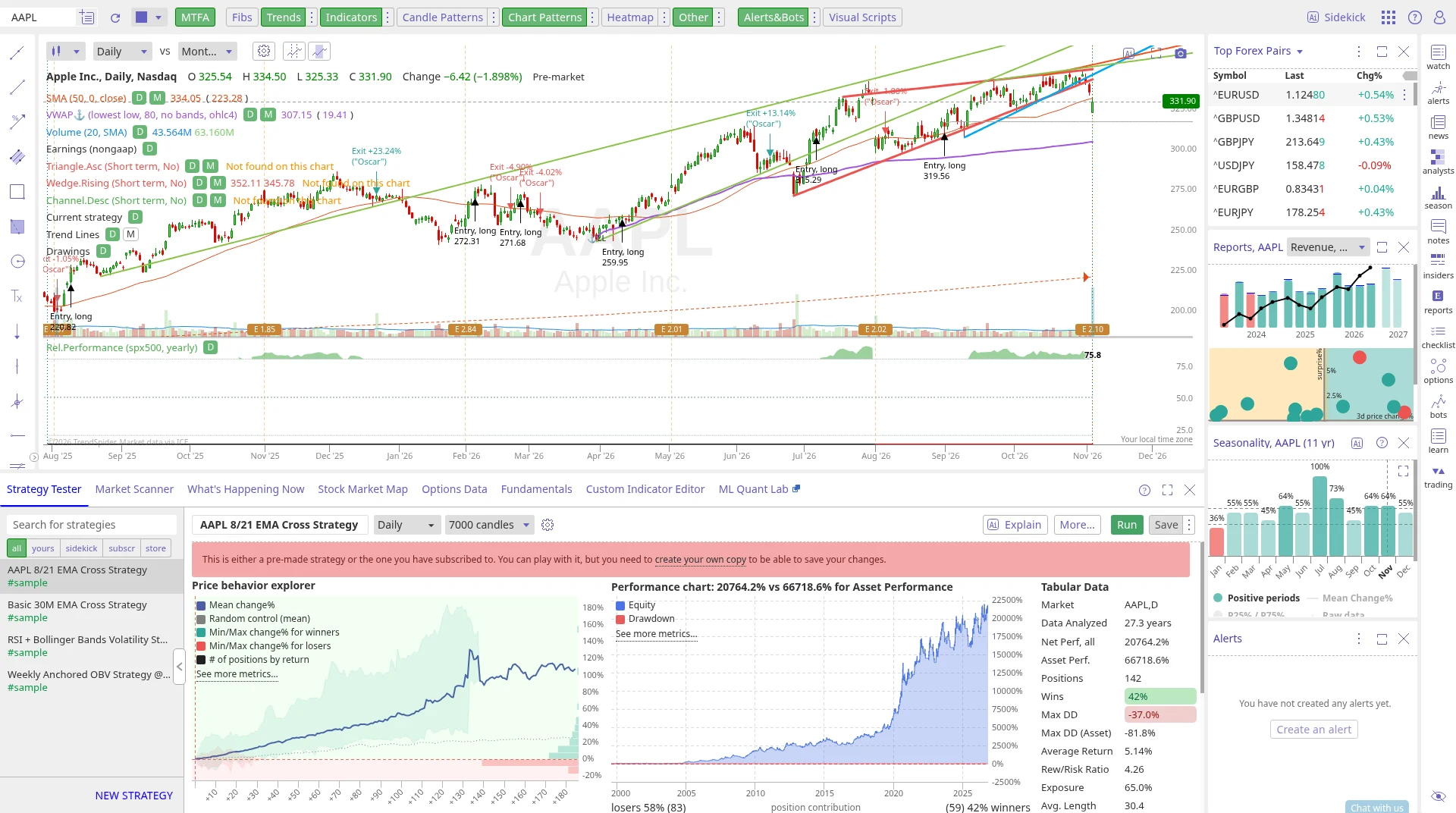
TrendSpider is a charting platform for active traders. It can draw trendlines and patterns for you, run scans, and backtest a setup. You can also set dynamic and multi-factor alerts and build trading bots. Official pricing says the number of active alerts and bots, and how long an alert lasts, depends on the plan. We do not quote those limits here because they can change by plan. Every plan includes every feature; higher plans raise the limits. Every plan also includes 5 free automated orders a month.
There is no free plan for the platform, only a free tier of the Sidekick AI assistant (25 messages a month). A 14-day paid trial costs from USD 19. Standard starts at USD 89 billed monthly.
- Suits: chart traders who want automated, multi-factor alerts on US stocks, ETFs, forex, crypto, futures or options.
- Less suited to: beginners who only want a few simple price alerts, which TradingView or Yahoo Finance can do for free.
See our TrendSpider review.
TipRanks, Finviz and other useful alerts
TipRanks sends watchlist email alerts for 5 stocks on the free Basic plan and 30 on Premium. It is a way to follow analyst-related updates on a short list, not a full chart-alert app. Premium is USD 29.95 a month billed yearly, with a 30-day money-back guarantee. See our TipRanks review.
Finviz is a fast US stock screener. Alerts need Finviz Elite: official pages list alerts for news, ratings, insider trading, SEC filings and price moves, and for when new stocks match a screen. Elite is USD 24.96 a month billed yearly, with a refund on written request in the first 30 days. The free screener has delayed data and no alerts. See our Finviz review.
Simply Wall St includes saved screeners with alerts on Premium and Unlimited. The free plan shows only the top 4 screener results and has limited saved screeners. See our Simply Wall St review.
Zacks includes email alerts with a free membership, next to its portfolio tracker. See our Zacks review.
Your broker’s own app is worth trying first if you only need a few price alerts on stocks you already hold. Those alerts are usually free with the account. A separate app is more useful when you want alerts on names you do not hold, on indicators, or across several brokers.
How to choose
- You want price and technical alerts on charts, in many markets: TradingView. Start on the free plan and move to Essential if 3 alerts is not enough.
- You want simple price alerts next to news and a portfolio: Seeking Alpha’s free Basic account, or the Yahoo Finance app.
- You trade from charts and want automated, multi-factor alerts: TrendSpider.
- You want email alerts on a short analyst watchlist: TipRanks.
- You want to be told when a new US stock matches a screen: Finviz Elite.
- You only follow a few holdings at one broker: try that broker’s own alerts first.
Set an alert as a reminder to look again, not as an instruction to trade. Prices can gap through a level, and delayed data can make a free alert late.
Frequently asked questions
What is the best stock alert app?
It depends on the kind of alert. For price and technical alerts on charts, TradingView is the strongest all-round choice, with a free plan of 3 active price alerts. For simple price alerts on your phone, Yahoo Finance and Seeking Alpha’s free Basic account are enough for many people. TrendSpider suits active chart traders who want automation.
Is there a free stock price alert app?
Yes. TradingView’s Basic plan includes 3 active price alerts. Seeking Alpha Basic includes price alerts. The Yahoo Finance iOS and Android apps let you set custom price alerts and send a push notification when the target is met. Many broker apps include price alerts as well.
How many alerts do I get on TradingView’s free plan?
3 active price alerts, each lasting up to 1 month. Technical alerts and watchlist alerts are not listed on Basic. Essential raises this to 20 price alerts and 20 technical alerts.
What is the difference between a price alert and a technical alert?
A price alert watches a symbol and a price level, for example when a stock crosses 150. A technical alert watches a condition on a chart, such as an indicator or a trendline. TradingView keeps a separate limit for each type.
Do I need to pay for stock alerts?
No, if a few simple price alerts are enough. Pay when you need more alerts at once, alerts that do not expire as quickly, alerts on indicators, or alerts when new stocks match a screen.
Prices at a glance
Prices from each official pricing page. Prices can differ by region and may exclude tax.
Research, not advice. This article explains how tools work. It is general information, not a recommendation to buy or sell any investment, and not personal advice. Investing puts your capital at risk and you can get back less than you put in. Prices and plans change, so check the official site before you pay.
Some links on this page are affiliate links. If you subscribe through them we may earn a commission, at no extra cost to you. We score every tool on the same published criteria, using facts from official pages and our own testing. How we make money. This page is general information, not personal investment advice.
Read next
 ReviewTradingView reviewThe easiest place to learn and use stock charts, with a useful free plan. Not a source of ratings or picks.Read the review
 ReviewSeeking Alpha reviewBest for reading analysis and ratings on US stocks in one place. Weak for non-US stocks.Read the review
 ArticleEarnings calendar tools compared (2026), free and paidEarnings calendar tools compared in plain English: free calendars from Yahoo Finance, Nasdaq and Earnings Whispers, plus Seeking Alpha, TradingView and Fiscal.ai, with prices.Read the article

 ArticleBest Finviz alternatives in 2026, free and paidFinviz alternatives compared in plain English: free and paid stock screeners with more markets, deeper data or better charts, and who each suits.Read the article