

Our verdict
TradingView is a charting platform. You get price charts for stocks, ETFs and other markets, hundreds of ready-made indicators, drawing tools, price alerts and a stock screener, all in the browser or the app.
The free Basic plan is enough to learn: 1 chart per tab, 2 indicators per chart, 1 watchlist of 30 symbols and 3 price alerts, with no card needed. Paid plans mainly add more of everything: more charts per tab, more indicators, more alerts and longer intraday history. Every screen in this review was taken on Kai's free Basic account: TradingView's pricing page lists the charts, 400+ built-in indicators, screeners, financials and 1 watchlist on Basic, and the forecast page is a public page.
It is less useful if you want someone else's opinion on a stock. TradingView shows data and charts; it does not give ratings or picks of its own.
Who it is for, and who it is not for
Good fit if you are
- Investors who want to look at price charts and simple indicators
- Beginners who want a free plan with no card to learn on
- People who want price alerts on US, UK, EU and UAE stocks in one app
Look elsewhere if you are
- Anyone who wants stock ratings, fair values or picks (TradingView shows data, not opinions)
- People who want a refund on a monthly plan: refunds are for annual plans only, within 14 days
- Investors who mainly track dividends and portfolio income
Key features
Charts and indicators
Price charts with 400+ built-in indicators and 100K+ indicators made by the community. Charts per tab go from 1 on Basic to 16 on Ultimate, and indicators per chart from 2 to 50.
Source: tradingview.comAlerts
Price alerts and alerts on indicators and drawings. Basic has 3 active price alerts; Essential has 20, Plus 100, Premium 400 and Ultimate 1,000. Alerts on indicators, strategies and drawings (technical alerts) are not included on Basic and start at 20 on Essential.
Source: tradingview.comScreeners
Stock, ETF and crypto screeners covering 150+ exchanges from 50+ countries, with 500+ fundamental and technical fields. The screeners and the financials (fundamental stock data) are included on the free Basic plan.
Source: tradingview.comWatchlists and portfolios
Basic has 1 watchlist of 30 symbols. Paid plans allow multiple watchlists of up to 1,000 symbols and several portfolios.
Source: tradingview.comPine Script
TradingView's own coding language for building custom indicators and alerts. Optional; you never need to code to use the charts.
Source: tradingview.comTradingView prices
| Plan | Billed monthly | Billed yearly | Notes |
|---|---|---|---|
| Basic (free) | Free | Free | |
| Essential | $14.95 | $155.40$12.95 a month | 95 a month when billed yearly |
| Plus | $34.95 | $359.40$29.95 a month | 95 a month when billed yearly |
| Premium | $69.95 | $719.40$59.95 a month | 95 a month when billed yearly |
| Ultimate | $239.95 | $2,399.40$199.95 a month | 95 a month when billed yearly |
Pros and cons
Pros
- Free Basic plan with no card needed
- Charts for US, UK, EU and UAE exchanges in one place
- Monthly or yearly billing on every paid plan
- Huge library of built-in and community indicators
Cons
- The free plan is tight: 2 indicators per chart and 3 price alerts
- Refunds only on annual plans, within 14 days of payment
- Real-time data for some exchanges costs extra on top of the plan
- No ratings, fair values or picks of its own
Guided tour: how TradingView looks inside
The same screens as above, in order, as a step-by-step tour. Each step zooms in on one part of the page.
Looking at one stock on free TradingView, step by step
We open an Apple chart, add an indicator, set an alert, then try the screener, the financials, the forecast page and the watchlist. Every step is on the free Basic plan. Use Next, the step list or your arrow keys. On a phone you can swipe.
-
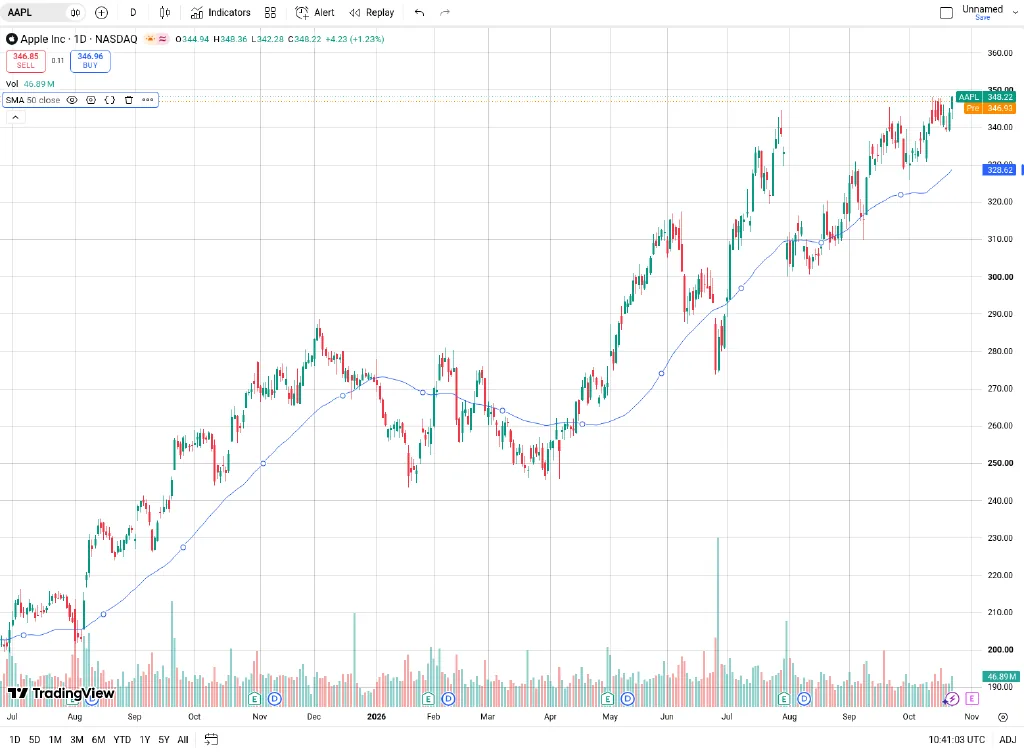
Step 1 of 7A daily chart with two indicatorsSupercharts is the main charting screen. Here Apple is on a daily chart with Volume and a 50-day simple moving average. Basic allows 2 indicators per chart.Open full screenshot -
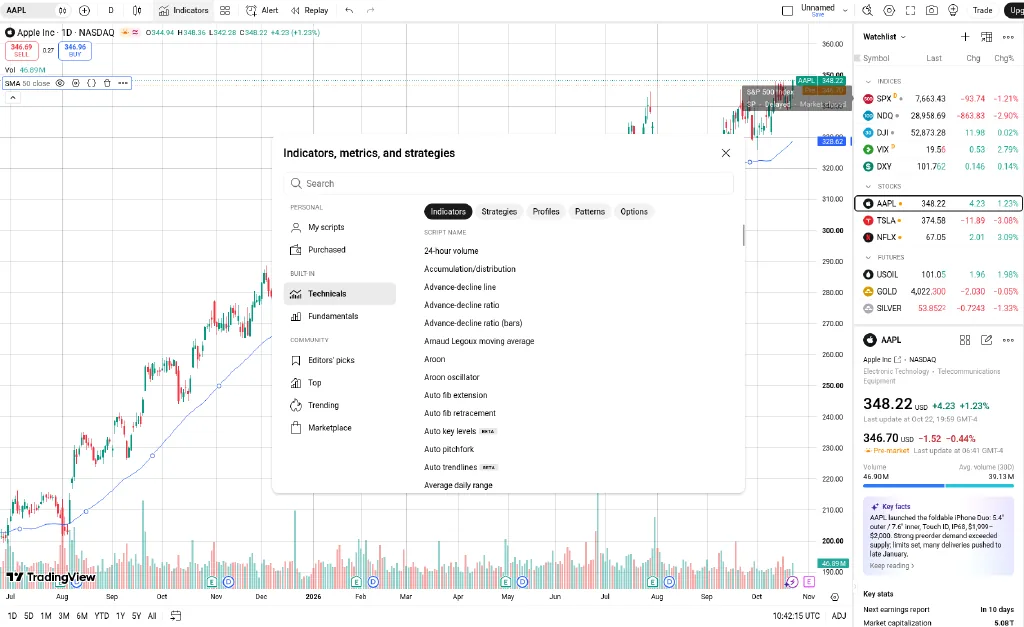
Step 2 of 7The indicator libraryIndicators opens a library of built-in technicals and fundamentals plus community scripts, sorted into groups such as Editors' picks and Trending.Open full screenshot -
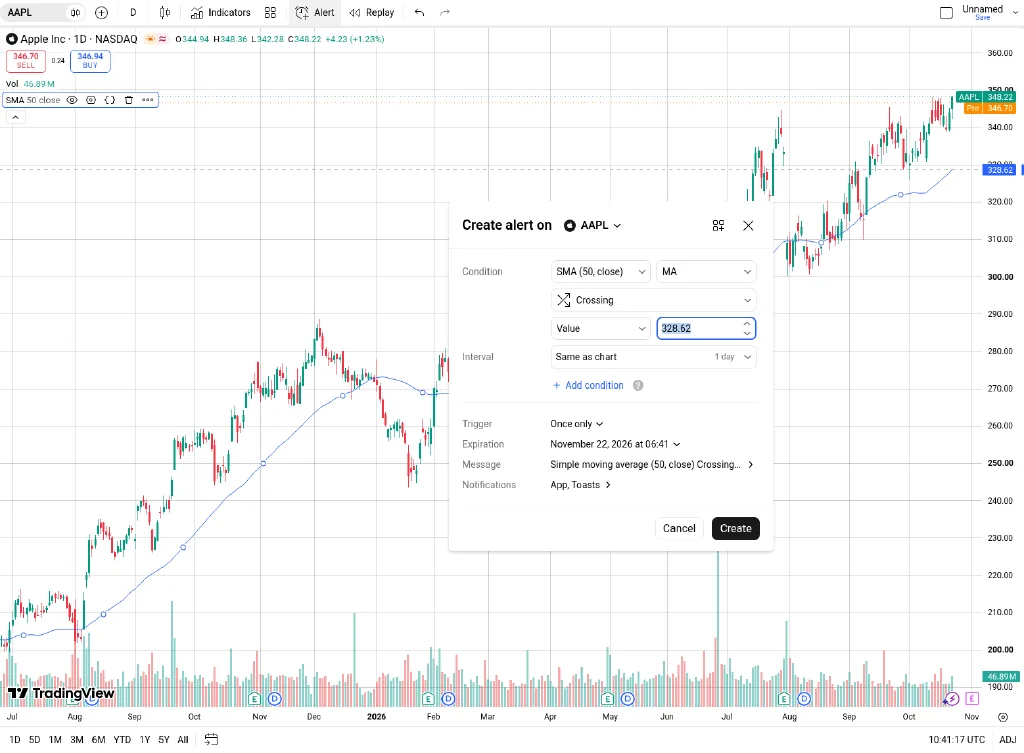
Step 3 of 7Setting an alertCreate alert asks for a condition, how often it triggers, an expiry date and how you want to be told. Basic includes 3 active price alerts; alerts on indicators need a paid plan.Open full screenshot -
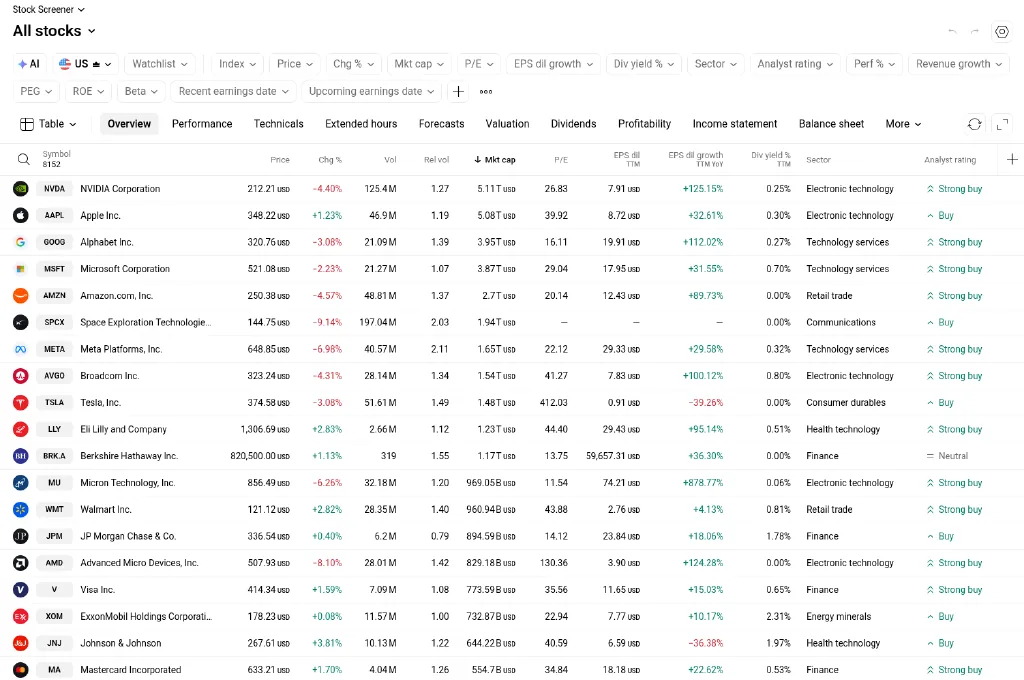
Step 4 of 7The stock screenerThe screener is included on Basic. Pick filters above the table and switch tabs to see valuation, dividends or performance columns.Open full screenshot -
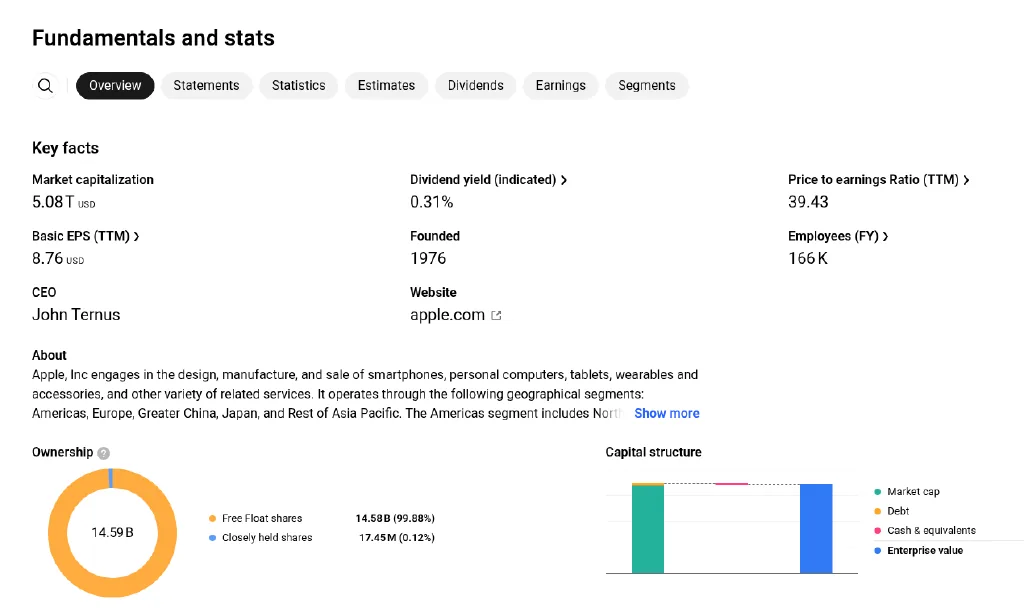
Step 5 of 7Key facts from the financialsThe Financials tab starts with key facts such as market cap, P/E and dividend yield, with full statements one tab away.Open full screenshot -
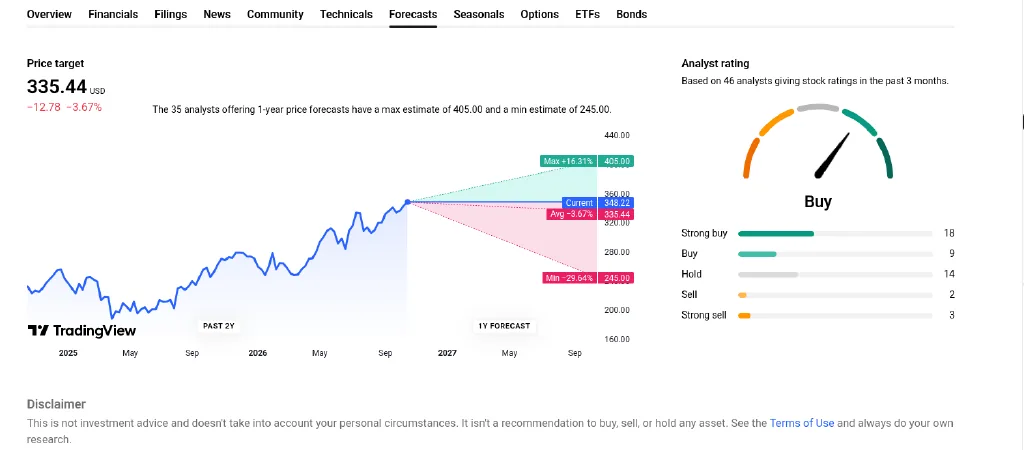
Step 6 of 7What analysts expectForecasts shows the range of analysts' 1-year price targets and a count of their ratings. These are other people's opinions, not TradingView's, and they are often wrong.Open full screenshot -
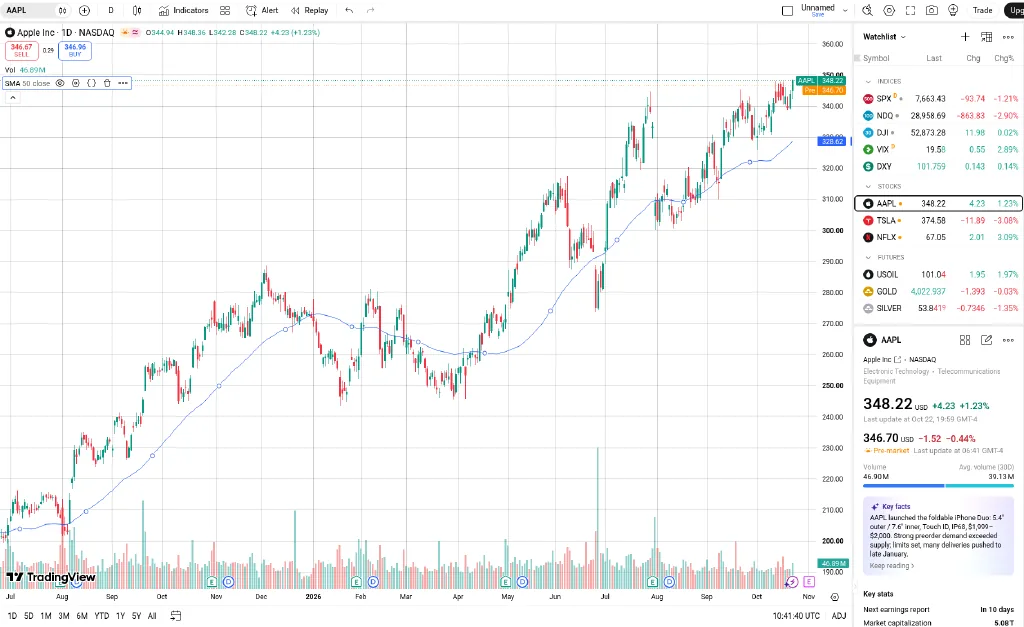
Step 7 of 7Your watchlistThe watchlist sits on the right of the chart. Click a symbol to load it and see its key facts underneath. Basic has 1 watchlist of up to 30 symbols.Open full screenshot
Screens from Kai's own free Basic TradingView account, captured 23 Oct 2026. AAPL and the other symbols are only examples of how the pages look, not recommendations. Analyst targets and ratings are opinions and change often.
How TradingView ranks for each job
We rank tools by job, not overall. We score every tool on the same published criteria, using facts from official pages and our own testing. How we score.
TradingView alternatives




Frequently asked questions
Is TradingView free?
Yes. The Basic plan is free forever and needs no card. It has 1 chart per tab, 2 indicators per chart, 1 watchlist of 30 symbols and 3 price alerts.
Does TradingView have a free trial?
Yes, on Essential, Plus and Premium. TradingView shows the trial length at sign-up, and it can vary by plan and region.
Can I get a refund?
Only on annual plans, and only if you ask within 14 calendar days of payment. Monthly plans, upgrades and market data are not refunded.
Does it cover UK, European and UAE stocks?
Yes. TradingView lists the London Stock Exchange, Xetra, Euronext, ADX, DFM and Nasdaq Dubai. Data is delayed on some exchanges unless you pay for real-time data.
Which plan should a beginner pick?
Start on the free Basic plan. Move to Essential only when you keep hitting the limit of 2 indicators or 3 alerts. Our TradingView plan picker can help you compare.
Does TradingView tell me what to buy?
No. It shows charts and data. Community ideas on the site are opinions of other users, not advice for your situation.
Some links are affiliate links, so we may earn a commission at no extra cost to you. How we make money. General information, not personal investment advice. Ratings and fair value estimates are model outputs or opinions and can be wrong.