

Our verdict
Snowball Analytics is a portfolio tracker built around dividend income. It shows a dividend calendar, forecasts your income for the year ahead and tracks yield on cost, alongside performance including fees and dividends.
You can connect over 1,000 brokers in the US, Europe, the UK and Asia, or import broker reports. The free plan covers 1 portfolio with 10 holdings. Paid plans start at USD 7.99 a month, and there is a 14-day free trial with no card.
It tracks assets on 70+ exchanges in 30+ currencies; we found a Dubai stock priced in dirhams. It is a tracker first, so company research is limited.
Who it is for, and who it is not for
Good fit if you are
- Dividend investors who want to see future income
- People with several brokers who want one view
- Investors holding stocks in many countries and currencies
Look elsewhere if you are
- People who want to research or rate new stocks
- Anyone with more than 10 holdings who does not want to pay
- Traders who want charts
Key features
Dividend calendar and forecast
See future dividend payouts for the year ahead, track dates and amounts, and forecast your passive income.
Source: snowball-analytics.comBroker connections
Automatic connections with over 1,000 brokers in the US, Europe, the UK and Asia, plus broker report imports.
Source: snowball-analytics.comPerformance and diversification
Performance including fees, dividends and trades, diversification by sector, class and region, and metrics such as the price to earnings ratio, beta (how much your holdings move with the market) and the Sharpe ratio (return for the risk taken).
Source: snowball-analytics.comBacktests
Test portfolio ideas on historical data, with 30+ years of data.
Source: snowball-analytics.comSnowball Analytics prices
| Plan | Billed monthly | Billed yearly | Notes |
|---|---|---|---|
| Free | Free | Free | |
| Starter | $7.99 | $79.99$6.67 a month | |
| Investor | $14.99 | $149.99$12.50 a month | |
| Expert | $24.99 | $249.99$20.83 a month |
Pros and cons
Pros
- Built around dividend income tracking
- Low-cost paid plans and a 14-day trial with no card
- Code KAI gives 10% off the first payment on any paid plan
Cons
- A tracker first, so company research is limited
- Free plan limited to 1 portfolio and 10 holdings
- More portfolios need the Investor plan
Guided tour: how Snowball Analytics looks inside
The same screens as above, in order, as a step-by-step tour. Each step zooms in on one part of the page.
Your portfolio on Snowball Analytics, step by step
We walk through the signed-in dashboard, holdings list, dividend calendar, growth chart and one stock page. Use Next, the step list or your arrow keys. On a phone you can swipe.
-
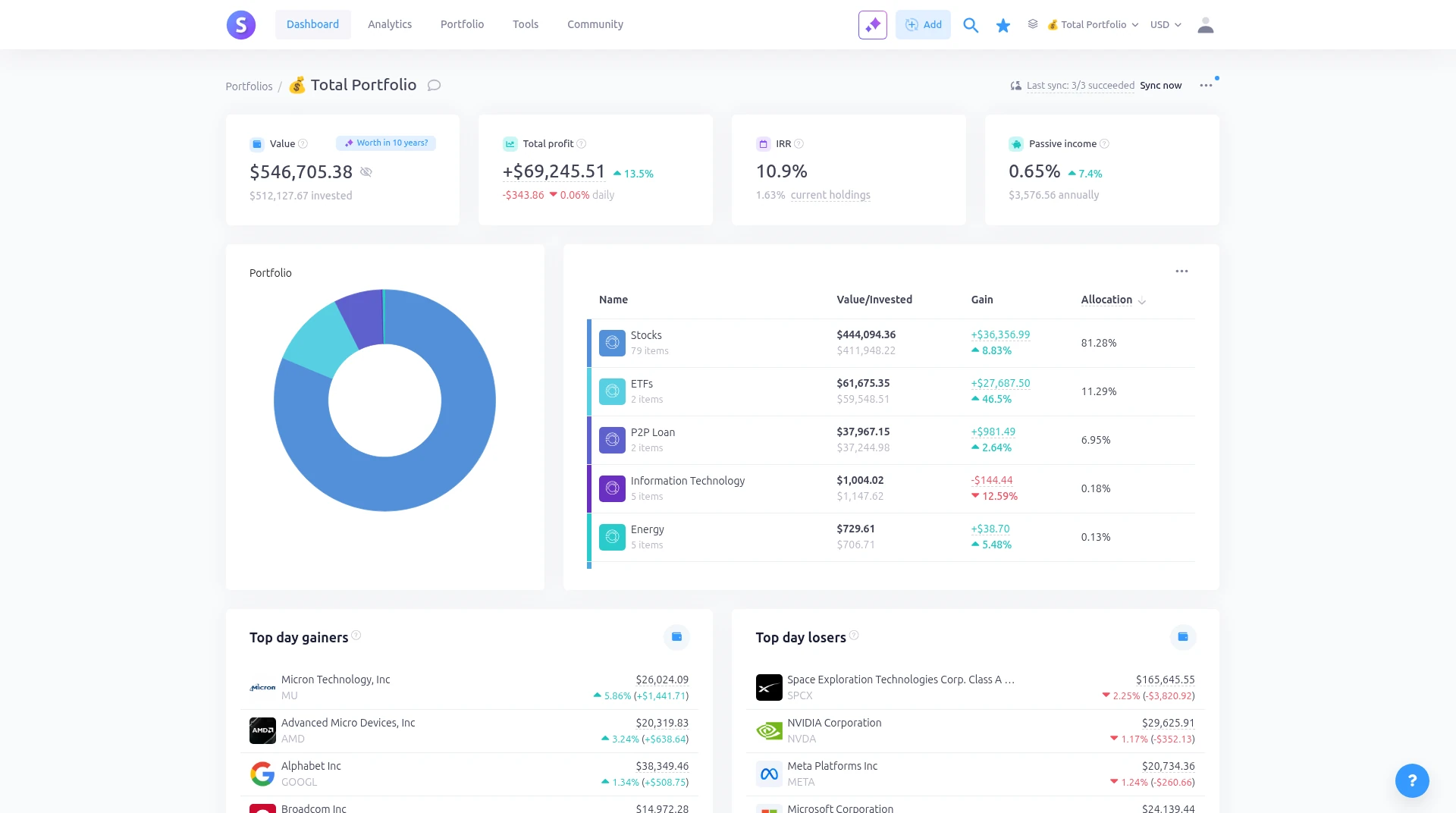
Step 1 of 7Your portfolio at a glanceThe Dashboard opens with four cards: portfolio value, total profit, IRR and passive income yield. Below them a donut and a table show how the portfolio is split by asset class.Open full screenshot -
Step 2 of 7How your money is splitThe donut and the table next to it list each asset class with its value, gain and share of the portfolio. Day gainers and losers sit underneath so you can see what moved today.Open full screenshot -
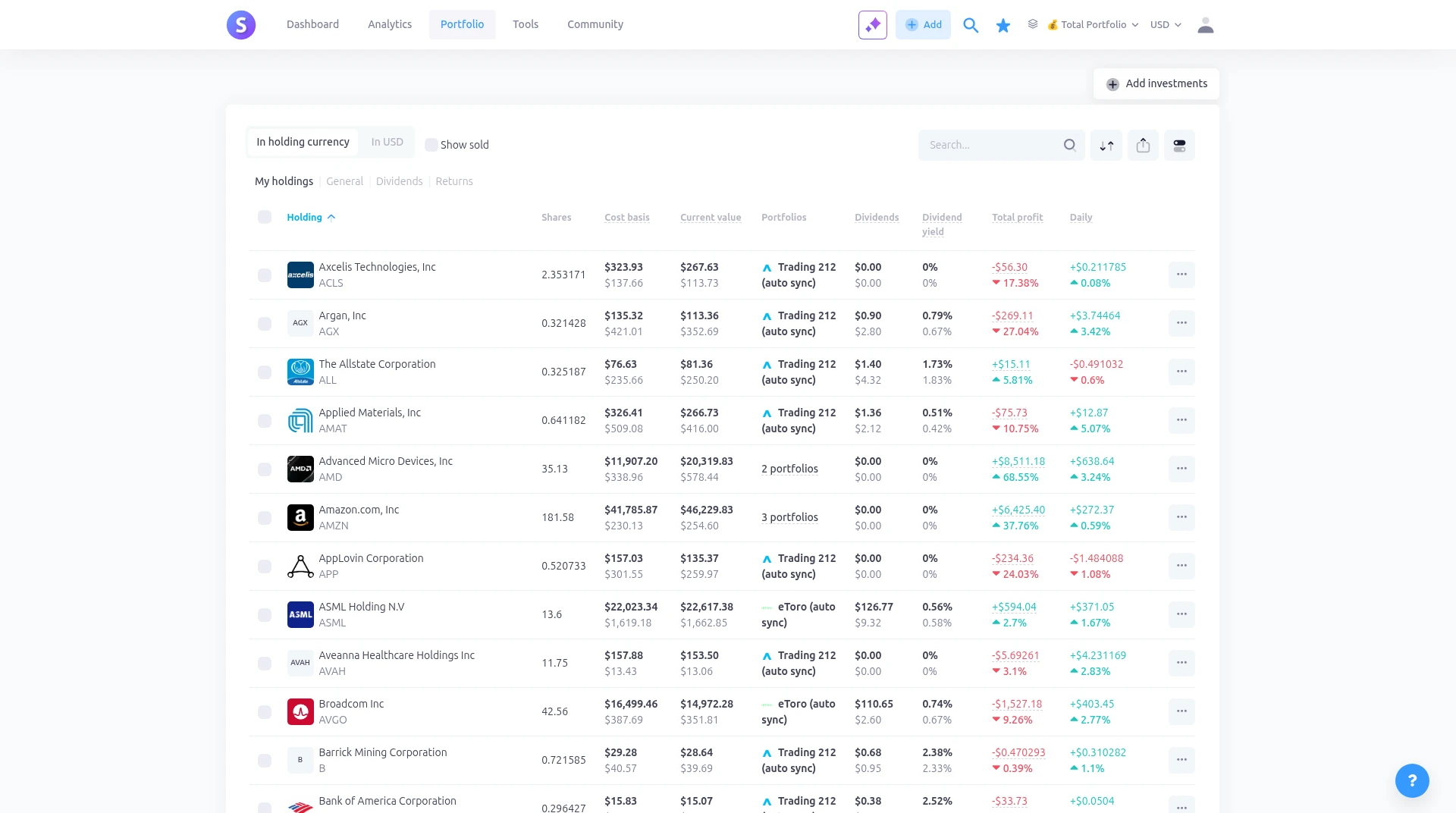
Step 3 of 7Every holding in one tableUnder Portfolio, My holdings lists each position with shares, cost basis, current value, dividends, yield, total profit and the daily change. Broker sync labels such as Trading 212 or eToro appear next to synced rows.Open full screenshot -
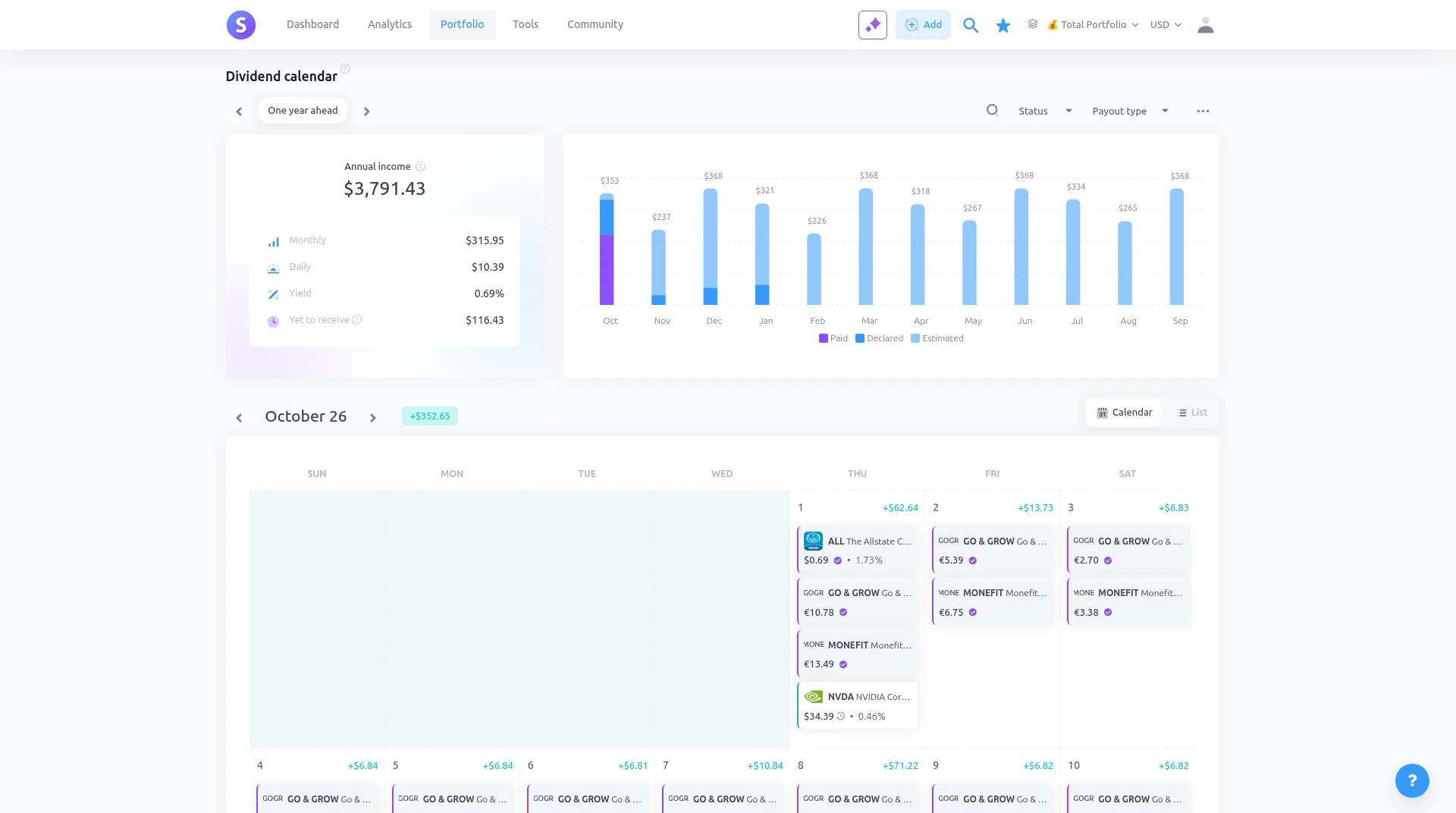
Step 4 of 7Annual income and the year aheadThe Dividends view opens with annual income broken into monthly and daily figures, plus yield. A bar chart next to it shows each month as paid, declared or estimated.Open full screenshot -
Step 5 of 7A calendar of dividend daysThe calendar marks each payment day with the ticker and amount. You can switch to a list view if you prefer rows to a month grid.Open full screenshot -
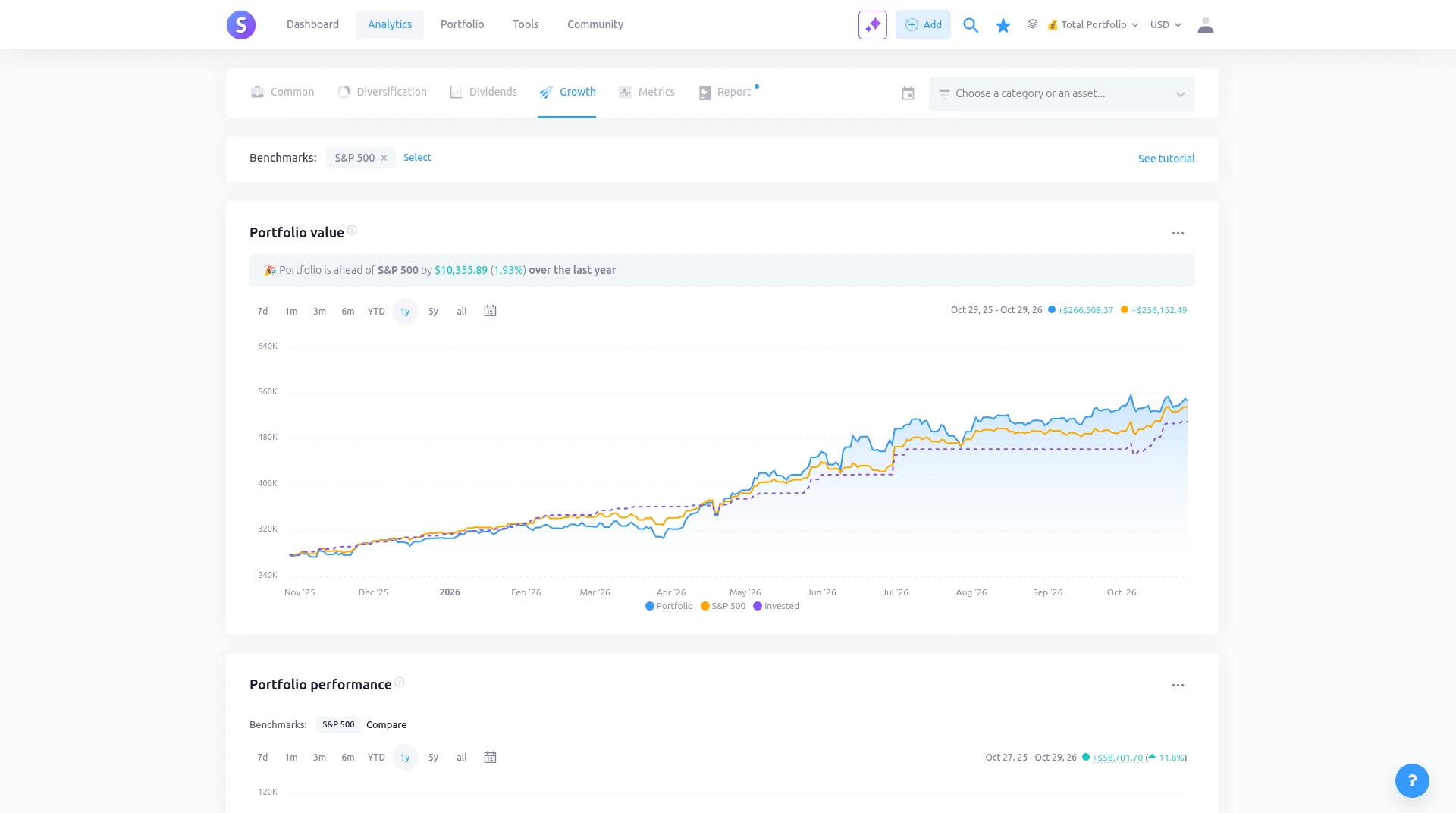
Step 6 of 7How the portfolio grewAnalytics shows how portfolio value and invested capital have moved over time, so you can see growth against money you put in.Open full screenshot -
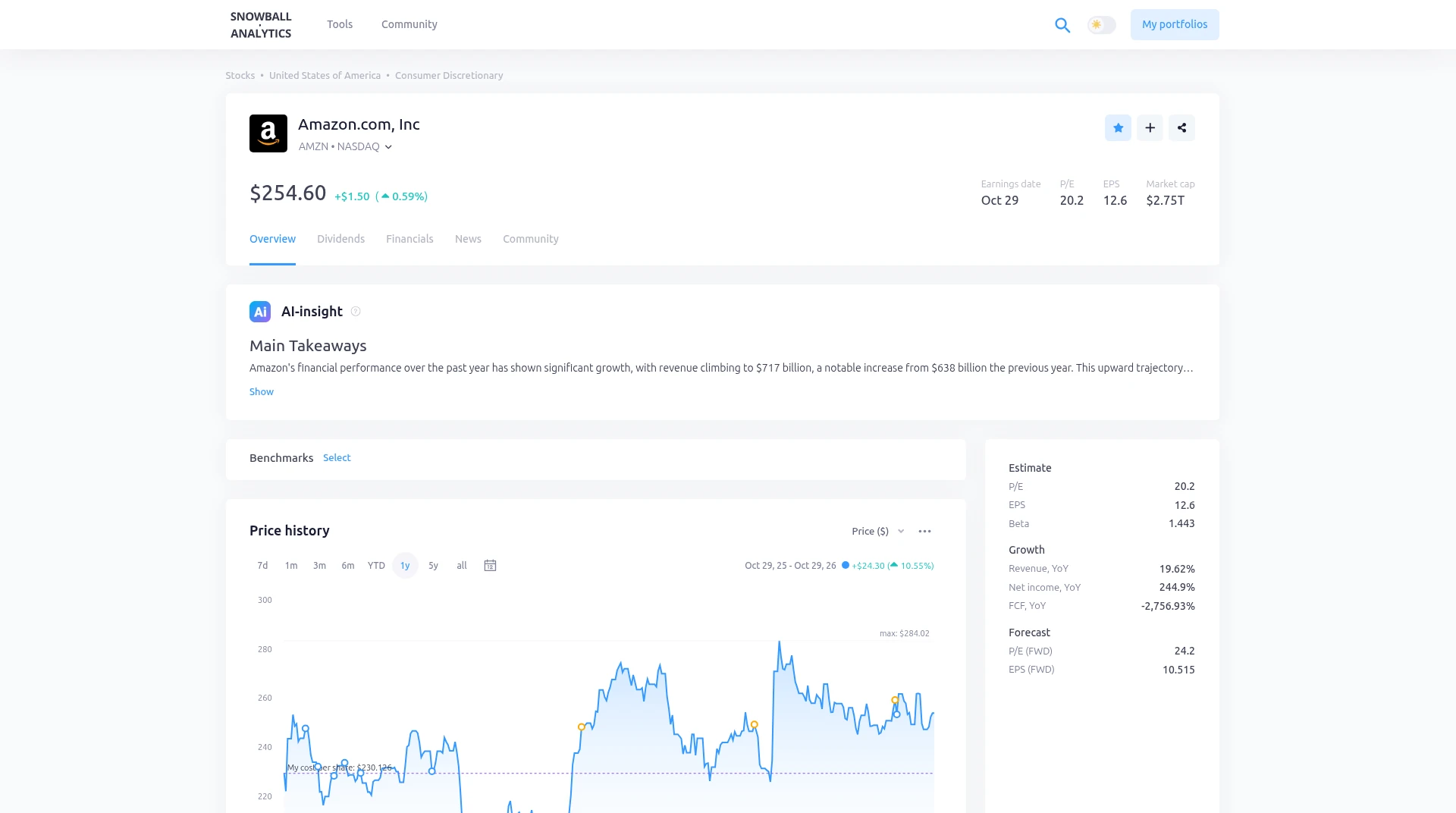
Step 7 of 7One stock in more detailOpening a holding shows that stock's page: an AI insight summary at the top, then the price chart and your position details underneath.Open full screenshot
Screens from Kai's own Snowball Analytics account, captured 29 Oct 2026. Holdings and amounts are from a real portfolio, shown for transparency. They are examples of how the screens look, not recommendations. Figures change every day.
How Snowball Analytics ranks for each job
We rank tools by job, not overall. We score every tool on the same published criteria, using facts from official pages and our own testing. How we score.
Snowball Analytics alternatives



Frequently asked questions
Is Snowball Analytics free?
Yes. The free plan has 1 portfolio, 10 holdings, 1 watchlist, a dividend calendar and broker report import.
Is there a Snowball Analytics discount code?
Yes. Code KAI gives 10% off the first payment on any paid plan (for example Starter from $79.99/yr to $71.99/yr). Enter it at checkout after you create a free account, or use our link. Renewals are at the normal price.
How does the free trial work?
You get 14 days of full access without a card, limited to 2 portfolios. After that the account moves to the free plan.
Does it work with UK, EU and UAE stocks?
Yes. It supports 70+ exchanges, including London and European exchanges. We found Emaar on the Dubai exchange, priced in AED.
Some links are affiliate links, so we may earn a commission at no extra cost to you. How we make money. General information, not personal investment advice. Ratings and fair value estimates are model outputs or opinions and can be wrong.