

Our verdict
- Ways to import
- Automatic connection, PDF or CSV statements, or by hand
- Free plan
- Unlimited bank and broker connections, real-time data, net worth
- Paid plans
- Premium €89.99 a year, Wealth €149.99 a year, excluding country taxes
- Free trial
- 7 days of Premium, once per user
- Works on
- Web, iOS and Android
- Company
- Founded in Germany in 2020, more than 500,000 users
I use getquin to see my whole portfolio in one place. Each broker I connect gets its own tab, and the Investments view adds them up into one total, with a performance chart, a holdings table and a chart of how the money is split. That single view is the main reason to use it, and it is free: the free plan includes unlimited bank and broker connections, real-time data and a net worth overview.
Premium (€89.99 a year, excluding country taxes) is for people who want to dig deeper: benchmarking against an index, time-weighted returns, a look inside the ETFs you hold, dividend forecasts and an AI portfolio analysis. Wealth (€149.99 a year) adds a retirement plan, saving goals and unlimited use of the AI financial agent. Premium has a 7-day free trial, once per user.
The weak spot is the import, not the charts. Which brokers connect automatically depends on your country, some connections bring in only today's holdings rather than your full history, and banks ask you to log in again every 90 days. Everything else on this page depends on that data being right, so the first thing worth checking is whether your own accounts come through cleanly.
Who it is for, and who it is not for
Good fit if you are
- Investors with money at several brokers or banks who want one total
- Beginners who want a clear picture of their portfolio without paying
- Dividend investors who want a calendar of upcoming payments
- People who also want cash, debts and property in one net worth figure
- Investors who like to read what other investors hold and discuss
Look elsewhere if you are
- People who need a tax report for filing in their country
- Anyone whose broker does not connect in their country and who does not want to enter trades by hand
- Investors who want monthly billing (the pricing page shows yearly prices)
- People looking for stock ratings or research on new companies
Key features
Broker and bank connections
Connect brokers and banks through Open Banking: pick your broker, choose Automatic connection and log in, and new buys and sells are added on their own. getquin says it works with thousands of providers. Where there is no connection, you can upload a PDF or CSV statement or add trades by hand, so any broker can be tracked.
Source: help.getquin.comNet worth in one place
Next to your investments, Networth lists cash accounts and debts, so you see what you own minus what you owe. Debts such as loans and real estate financing can be added by hand.
Source: help.getquin.comDividend calendar and forecasts
The dividend tracker is free: a calendar of received and announced dividends, with notifications when a dividend is paid. getquin shows the gross dividend, before withholding tax. Premium adds the forecast for the current year, a long-term dividend growth forecast, yield on cost and payout growth.
Source: getquin.comPerformance and benchmarking
Premium shows time-weighted return (TTWROR) and internal rate of return (IRR). Time-weighted return removes the effect of money you add or take out, so it shows how your holdings did rather than how much you paid in. Benchmarking compares your portfolio with an index, a stock, an ETF or another of your portfolios.
Source: help.getquin.comDeepDive: what is inside your ETFs
A Premium feature that breaks the ETFs you hold into their parts and adds them to your other positions. If you own Apple shares and also hold ETFs that contain Apple, it shows your real total share of Apple. getquin notes it cannot do this for every ETF or active fund yet.
Source: help.getquin.comAI portfolio analysis
Premium gives the portfolio an AI score across four areas: diversification, risk, fees, and how it behaves in different market phases and interest rates. Premium users get 15 analyses a month. getquin says only the ISIN, the weight of each position and data such as sector and country are sent, not amounts or personal data.
Source: help.getquin.comAI financial agent
A chat that answers questions about your own portfolio, such as what drove recent returns or which dividends are coming up. It is unlimited on Wealth, and Free and Premium users can try it 5 times. getquin warns the AI can make mistakes and its answers are not financial advice.
Source: help.getquin.comCommunity
getquin is also a social network for investors: a feed of posts, stock chats, and the option to follow other investors and look at portfolios they share. The forum is free.
Source: getquin.comWealth planning
Wealth adds a retirement plan, where you set savings rates and goals, and Saving Goals with milestones you can track. It includes everything in Premium.
Source: help.getquin.comFree vs Premium vs Wealth: what each plan includes
getquin has three plans. Prices are yearly and exclude country taxes and fees, which are added at checkout. The table uses getquin's pricing page and Help Centre, checked on 29 October 2026.
| Feature | Free | Premium | Wealth |
|---|---|---|---|
| Price a year | €0 | €89.99 | €149.99 |
| Unlimited bank and broker connections | |||
| Real-time prices and net worth overview | |||
| Dividend tracker and calendar | |||
| Community feed and stock chats | |||
| Benchmarking and time-weighted return | |||
| Dividend forecasts and yield on cost | |||
| DeepDive look inside your ETFs | |||
| AI portfolio analysis | 15 a month | ||
| AI financial agent chat | 5 tries | 5 tries | Unlimited |
| Retirement plan and saving goals | |||
| AI help reading statements on import | About 3,000 transactions a month | About 9,000 a month | About 15,000 a month |
| Free trial | Not needed | 7 days, once per user | Not stated |
You can pay with Apple Pay, Google Pay or a card, and with PayPal on the web. A subscription bought in the app is cancelled in your Apple or Google account, and one bought on the web in getquin's account settings. Deleting your getquin account does not cancel a subscription.
getquin prices
| Plan | Billed monthly | Billed yearly | Notes |
|---|---|---|---|
| Free | Free | Free | EUR 0 a year: unlimited bank and broker connections, real-time data, net worth overview, essential portfolio analysis |
| Premium | Not shown | €89.99€7.50 a month | 99 a year, excluding country taxes. AI portfolio analysis, dividend KPIs and forecasts, advanced performance analytics, detailed allocation breakdown. 7-day free trial |
| Wealth | Not shown | €149.99€12.50 a month | 99 a year, excluding country taxes. Everything in Premium plus financial planning, goals, a retirement plan and unlimited AI financial agents |
How to get started with getquin
Setting up takes a few minutes. These steps follow getquin's Help Centre; the web app and the mobile app work the same way.
- Create a free account
Sign up on the web, or download the iOS or Android app. The free plan costs €0.
- Connect your first broker
Click +Import, create a new portfolio, choose Investments, search for your broker, pick Automatic connection and log in. Save your PIN when asked, so the holdings can update every day.
- Check what came through
Before each automatic connection, getquin tells you whether it will import your full history or only today's holdings. If it is holdings only, add the original purchase dates in the transactions so returns and dividends start from the right day. Compare the positions with your broker app.
- Add the rest
Repeat for other brokers and banks. If a broker has no automatic connection in your country, use File Import to upload PDF trade statements or a CSV export, or enter trades by hand. Cash accounts and debts go into Networth.
- Try Premium if you want the deeper tools
Premium has a 7-day free trial, once per user. Cancel at least 24 hours before it ends if you do not want the yearly plan.
- Reconnect every 90 days
Banks require you to log in again every 90 days. Tap Update, log in, and the transactions carry on.
Sources: getquin Help Centre on Open Banking, file import, manual transactions and the free trial, checked 29 Oct 2026.
Pros and cons
Pros
- Free plan with unlimited bank and broker connections
- Investments, cash and debts together as one net worth figure
- Free dividend tracker and calendar
- Time-weighted returns and benchmarking on Premium
- DeepDive shows what sits inside your ETFs
- Web, iOS and Android apps, plus an active investor community
Cons
- Automatic connections depend on your country and broker
- Some connections import only current holdings, not the full history
- Banks ask you to log in again every 90 days
- Yearly prices in EUR on the pricing page, excluding country taxes
- The free trial turns into a yearly plan unless you cancel 24 hours before it ends
- The app shows ads, which getquin lists as one of its sources of income
getquin vs Snowball Analytics and other trackers
getquin and Snowball Analytics are the top two in our best portfolio trackers ranking. Both connect to brokers and track dividends. The differences are the free plan, the currency you pay in, and what each one is built around.
| Feature | getquin | Snowball Analytics |
|---|---|---|
| Free plan | Unlimited bank and broker connections | 1 portfolio, 10 holdings |
| First paid plan | Premium €89.99 a year | Starter $79.99 a year |
| Free trial | 7 days of Premium, once per user | 14 days, no card needed |
| Built around | Net worth across brokers, banks and other assets, plus a community | Dividend income and dividend forecasts |
| Broker connections | Thousands of providers, availability varies by country | Over 1,000 brokers in the US, Europe, the UK and Asia |
| Extras | AI analysis, AI agent, retirement planning on Wealth | Backtests on 30+ years of data, CSV export |
In short, getquin gives the broader picture of your money, with a free plan that has unlimited connections. Snowball is narrower and goes deeper on dividend income. Other trackers we review: Sharesight for performance and tax reports, Delta for stocks and crypto in one app, and Kubera for net worth across many asset types.
Is getquin safe? Data and security
Linking a broker account to an app is worth being careful about. This is what getquin states on its official security and help pages, checked on 29 October 2026.
Read-only access
Broker and bank connections are read-only. getquin can read holdings and transactions but cannot place trades or move money. It never sees your login details at your bank: connections run through regulated providers under the EU payment rules (PSD2).
Source: help.getquin.comEncryption and servers
Data is encrypted with AES-256 in transit and at rest, and stored on servers in Germany and Europe that follow the card-industry security standard PCI-DSS.
Source: getquin.comHow getquin makes money
getquin says it does not sell personal data. It lists venture capital, Premium and Wealth subscriptions, ads in the app, getquin Advisory fees and insurance brokerage commissions as its income.
Source: help.getquin.comWhat the AI sees
The AI portfolio analysis receives the ISIN, the weight of each position and data such as sector and country, not amounts or personal data. Statements read by AI during file import go to OpenAI through its Business API, which excludes training on or storing your data.
Source: help.getquin.comDeleting your data
You can delete your account under Settings, Account settings. getquin says the data is removed within minutes and cannot be recovered.
Source: help.getquin.comWho is behind it
getquin was founded in Germany in 2020 and says it has more than 500,000 users and over €20 billion of tracked assets.
Source: getquin.comGuided tour: how getquin looks inside
The same screens as above, in order, as a step-by-step tour. Each step zooms in on one part of the page.
Your portfolio and feed on getquin
Two signed-in screens: the Investments portfolio view and the Community Feed. Use Next, the step list or your arrow keys.
-
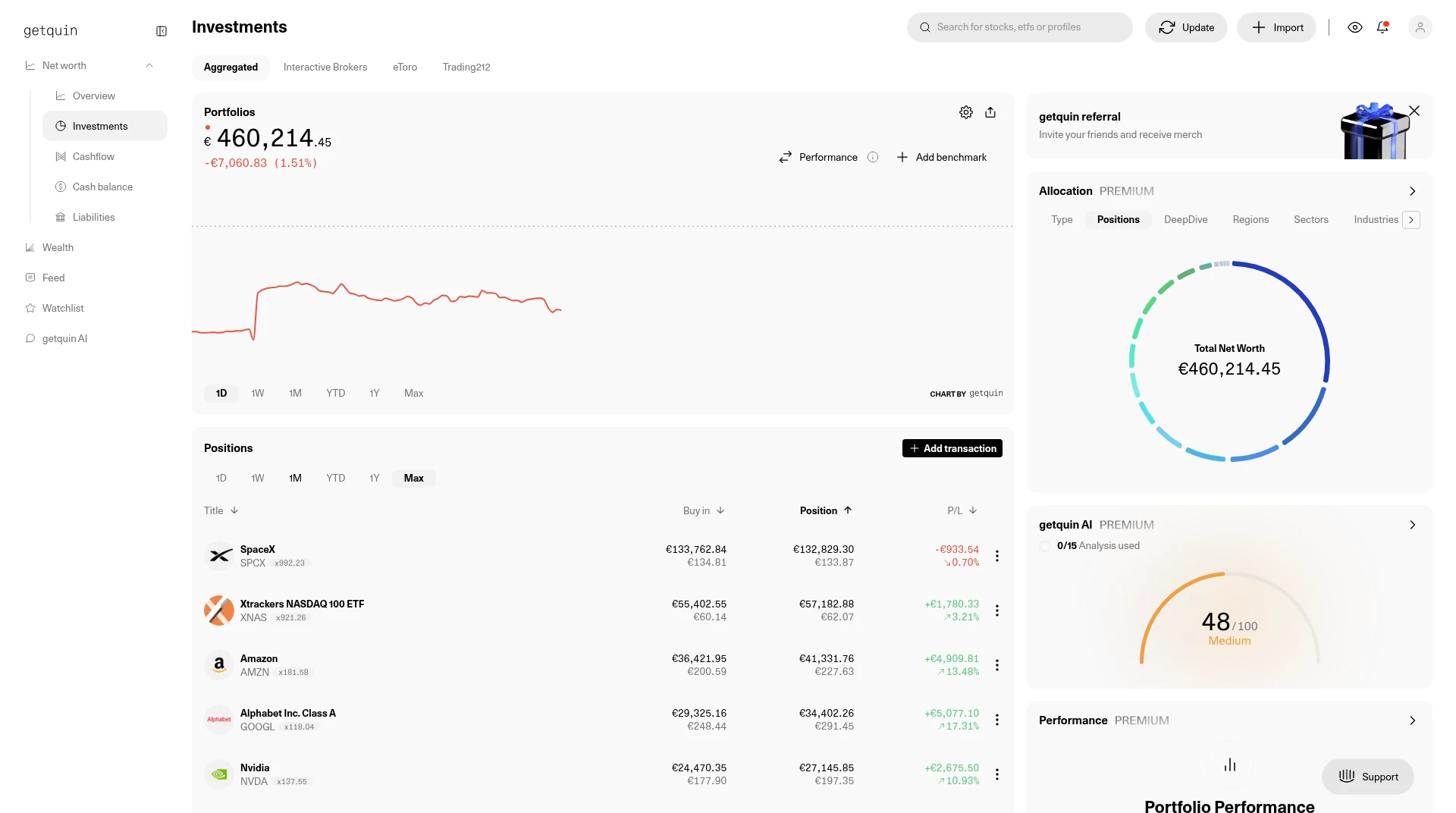
Step 1 of 3Investments overviewInvestments opens with total value, a performance chart and tabs for each connected broker. The positions table below lists each holding with buy-in, value and profit or loss.Open full screenshot -
Step 2 of 3Allocation and AI scoreOn the right, Premium panels show how the portfolio is split and a getquin AI score for the portfolio. These sit beside the holdings list so you can see allocation without leaving the page.Open full screenshot -
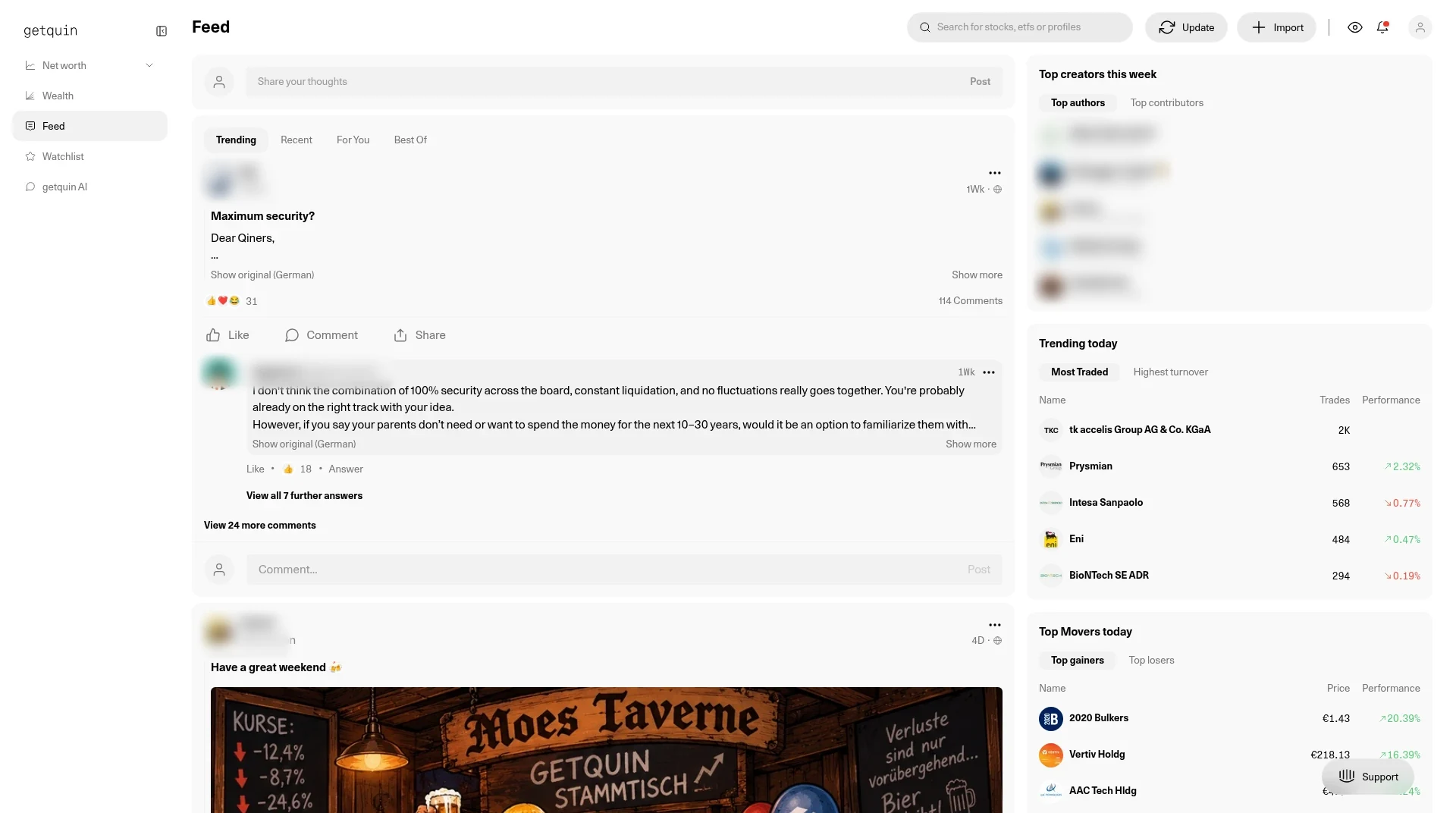
Step 3 of 3Community FeedThe Feed shows posts and portfolio updates from other getquin users. Trending is one tab; you can also follow people whose updates you want to see.Open full screenshot
Screens from Kai's own getquin account, captured 28 Oct 2026. Holdings and amounts are from a real portfolio, shown for transparency. Holdings and community posts are examples of how the screens look, not recommendations. Names of other members are blurred.
How getquin ranks for each job
We rank tools by job, not overall. We score every tool on the same published criteria, using facts from official pages and our own testing. How we score.
getquin alternatives


Frequently asked questions
Is getquin free?
Yes. The free plan costs €0 and includes unlimited bank and broker connections, real-time data, a net worth overview, the dividend tracker and the community. Premium and Wealth add deeper analysis and planning.
How much does getquin Premium cost?
Premium is €89.99 a year and Wealth is €149.99 a year. Prices exclude country taxes and fees, which are added at checkout.
Does getquin have a free trial?
Yes. Premium can be tried free for 7 days, once per user. Cancel at least 24 hours before the trial ends, or it converts to a yearly subscription.
Which brokers work with getquin?
getquin says it connects to thousands of banks and brokers. Availability depends on your country, because Open Banking cannot be offered everywhere for regulatory reasons. Search for your broker under +Import to see what is available to you. File import and manual entry work for any broker.
Can getquin trade or move my money?
No. Connections are read-only, so getquin can read your holdings and transactions but cannot place trades or make changes to your accounts.
Does getquin work outside Europe?
The app is available worldwide on the web, iOS and Android, and manual entry works for brokers anywhere. On 22 Oct 2026 I loaded getquin's public stock pages for Apple (US), Vodafone (London), SAP (Germany) and Emaar (Dubai). Automatic broker connections vary by country.
Where does getquin get its prices?
Real-time prices come from the Lang & Schwarz and Stuttgart exchanges in Germany, fundamental data such as sectors from FactSet, and crypto prices from CoinGecko.
getquin or Snowball Analytics: what is the difference?
getquin's free plan has unlimited connections and adds cash, debts and other assets into net worth, with prices in EUR. Snowball's free plan covers 10 holdings, its paid plans are in USD, and it is built around dividend income. See the comparison table above.
Some links are affiliate links, so we may earn a commission at no extra cost to you. How we make money. General information, not personal investment advice. Ratings and fair value estimates are model outputs or opinions and can be wrong.